En esta página
Copy Trading between MT5 accounts
Use the Connection Editor to link accounts, enable forwarding on the source, and map symbols when each broker uses different names.
What it is
It is a trade replication system between your own MT5 accounts that are connected to TPL Cloud: you choose which account sends and which ones receive the copy. Everything is private to your user—you are not subscribing to signals from strangers, and it is not the usual “social” copy trading offered by brokers to follow third parties.
In the Connection Editor you can mix it on the same canvas with the TradingView flow. TradingView: webhook → mapping → account (signals from outside). Copy Trading: account → mapping → account (from one MT5 to another). The mapping nodes look the same; you tell them apart by what you connect: a webhook on one side, or two accounts linked together.
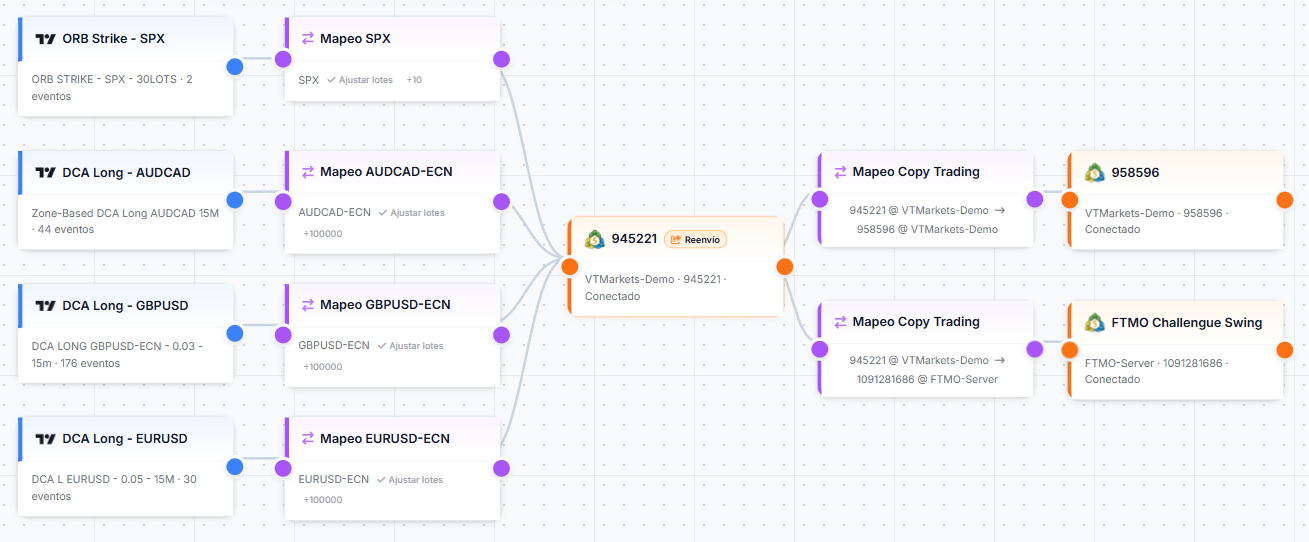
Connect two accounts
Forwarding (source account)
On the account that should send the trades, turn Forwarding on. That account is the one that copies outward. The other accounts you linked through this mapping are the ones that receive the copy.
How to enable or disable it:
- On the canvas, double-click the MT5 account node that should send the copy.
- A window titled Forwarding (Copy-Trading) opens. Turn Enable forwarding on or off.
- Click Save at the bottom of that window (this applies the change right away). This is separate from Save at the top of the editor, which saves the whole connection map.
Symbol pairs (same broker vs different)
If both accounts use the same server or broker, symbol names are often identical on source and replica—you can leave the replica field empty to use the same symbol, or type the same name in both columns.
If the brokers differ, each side may use different symbols (e.g. EURUSD vs EURUSD.r). In the mapping window, add one row per pair: what the sender uses → what the receiver must use. The suggestions while you type are per account, so you don’t mix symbols from two different brokers in one list.
Lot multiplier (Copy Trading mapping)
This multiplier applies only to the mapping between two accounts. It only changes volume on that copy link. The multiplier or divisor in the webhook → account chain is separate and only affects alerts from TradingView.
Use whole numbers only: 1 = same size as calculated for the replica, 2 = double, 3 = triple. Example: if the replicated trade would be 0.01 lots, multiplier 2 makes it 0.02 on that destination account only.
Save the map
Press Save at the top when you’re done. If you move things around or change forwarding or mappings but forget to save, your work may be lost when you come back.
Pause and copy trading
If a replica is paused (manual, safety close or daily limits), it does not open new copied trades. Closes and SL/TP changes still replicate. The browser extension is not affected. Pausing a source does not stop forwarding. Full detail: Pause / Resume Trading.