
EC Markets
 Trading Pine LabCloud
TradingView → MetaTrader 5
Already using TradingView and MT5, and sending those alerts by hand? Trading Pine Lab connects your own alerts and strategy to your MT5 account, and automates execution only — 24/7.
Start with an MT5 demo account and check the full connection before using a live account.
7-day free trial · No card · No VPS · No need to leave your PC on
Guided setup in the dashboard, step by step.
You can set up the full connection with an MT5 demo account. Check TradingView → TPL Cloud → MT5 before connecting a live account.
Trading Pine Lab is not a broker, does not hold funds, and does not provide signals or strategies. You decide which alerts to send and which account executes them.
Platform statusCompatible with 250+ brokers and leading prop firms













Technical compatibility does not imply affiliation, sponsorship, or endorsement by the brokers or platforms mentioned.
No code and no VPS. Set it up once; execution keeps running even if you shut down your PC.
 TradingViewAlert sentTPL CloudValidation + risk OK
 MetaTrader 5Order executed
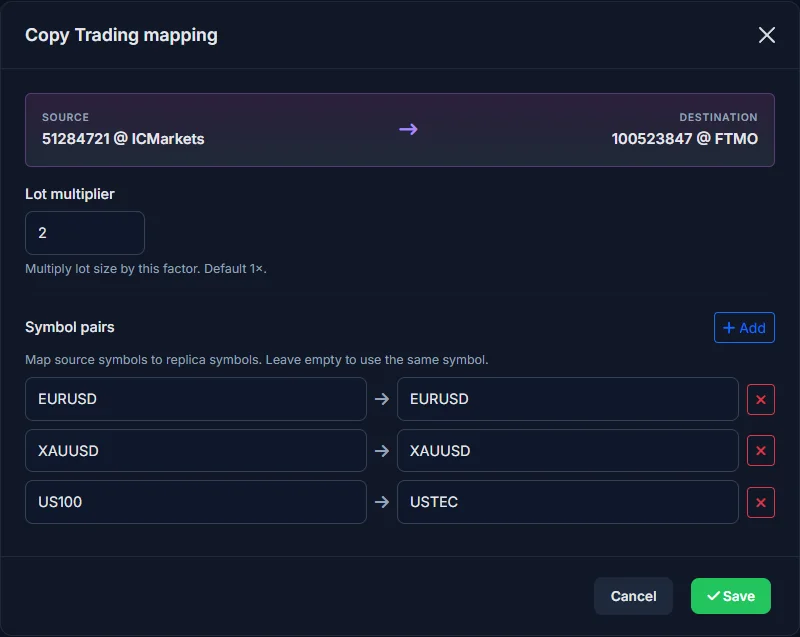
Drag, connect, done. Copy to another MT5 with pairs and a lot multiplier if you need it. No code, no VPS.
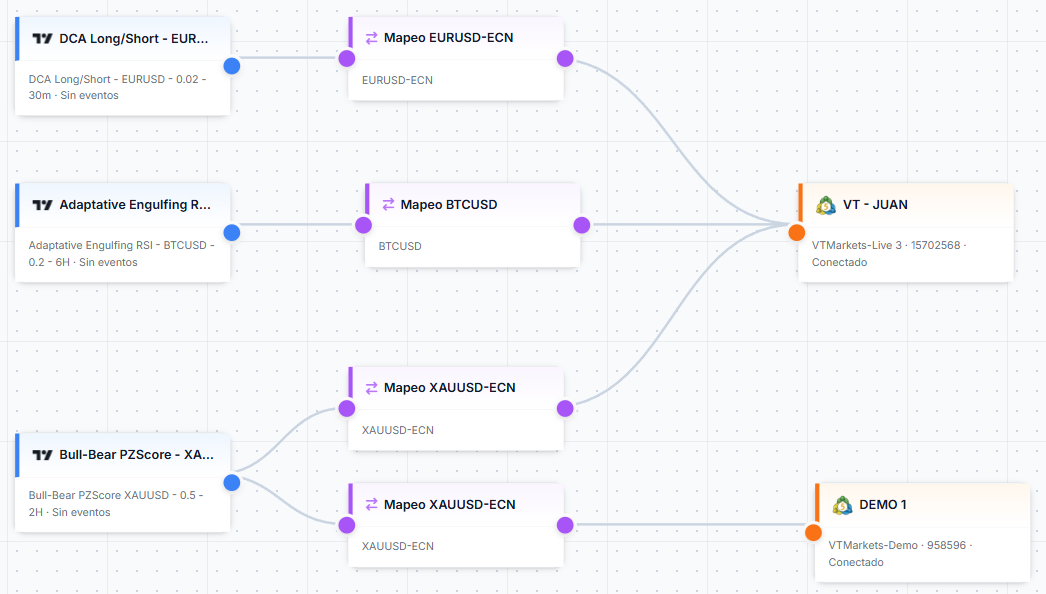
Built for traders who run TradingView alerts on MetaTrader 5.
No VPS, no PC running. Our servers process your alerts day and night.
From alert firing to order reaching MT5. Final execution depends on your broker.
Create as many as you need. No restrictions on strategies or alerts.
EURUSD on TradingView → EURUSD.r at your broker. Set it in the Connection Editor and alerts translate automatically.
Scale the same alert with different risk per account: ×1, ×2, ×3… Configurable per mapping.
Check the log of every alert: status, account, symbol, executed volume, and result.
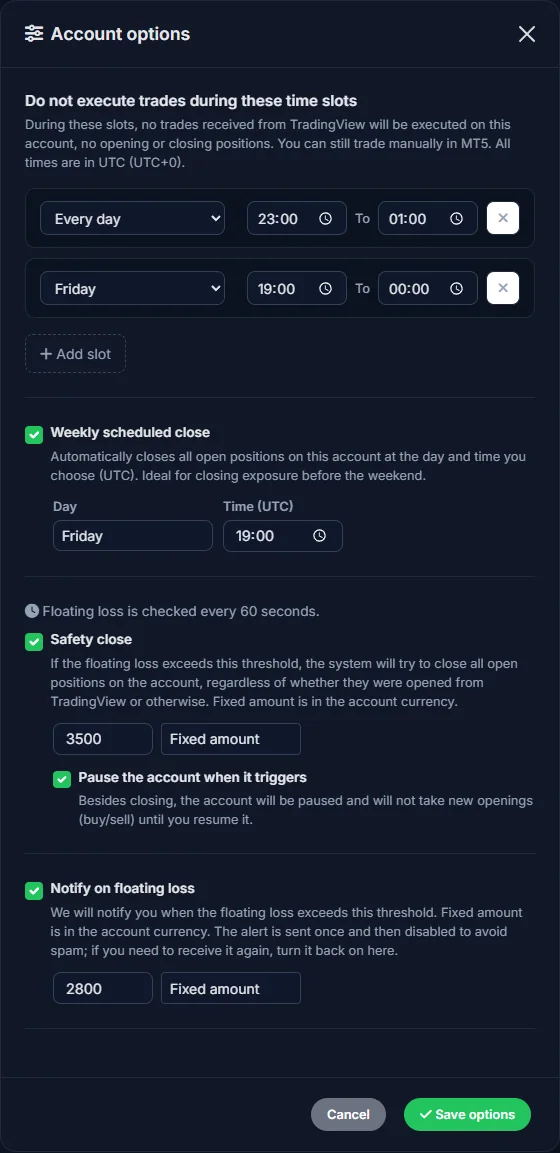
Every connected MT5 account includes configurable risk controls to adapt execution to your operating rules.
If floating loss exceeds the threshold (fixed amount or % of balance), all positions close automatically.
Email and Telegram notification when floating loss exceeds your threshold. Checked every 60 seconds.
Auto-close before high-impact news: 5 min, 15 min, or 1 hour before. Filters by currency and impact.
Define up to 3 time slots (UTC) when trades will not execute.
Close all positions automatically at the day and time you choose. Ideal before the weekend.
Alerts when a trade fails, the account disconnects, or the safety close triggers.
Pick the plan that fits your accounts. Cloud execution, <1s latency, and cancellation anytime.
7-day free trial · no card required · You can start with an MT5 demo account
EUR15.99/mo
191.90 EUR billed yearlyThe same features on every plan. The plan sets the price and how many MT5 accounts are included.
EUR43.99/mo
527.90 EUR billed yearlyThe same features on every plan. The plan sets the price and how many MT5 accounts are included.
EUR107.13/mo
1,285.60 EUR billed yearlyThe same features on every plan. The plan sets the price and how many MT5 accounts are included.
Yes. You can start with an MT5 demo account to check the full TradingView → TPL Cloud → MT5 connection before using a live account.
Start with an MT5 demo account, check the full flow, then decide whether to connect a live account.