 Trading Pine LabCloud
Looking for a PineConnector alternative?
Connect your TradingView alerts to a hosted MT5 account. Try Trading Pine Lab with your own setup for 7 days, without a credit card.
Starter vs Core
Price, hosting and trial compare Starter with Core on monthly billing. Every Trading Pine Lab plan includes the same features. A higher plan only changes the price and the number of hosted MT5 accounts: 1 on Starter, 3 on Pro and 10 on Business.
| Compared | Trading Pine Lab | PineConnector Core |
|---|---|---|
| Monthly price | Starter: 19.99 EUR per month, billed monthly | 59 USD per month, launch price |
| Connections included | Unlimited. No cap on webhooks or alerts. | One connection |
| MT5 hosting included | Starter: one hosted MT5 account. | Yes. One hosted MT5 instance via Edge. |
| Try it on your own account before you pay | 7-day trial, no card. You can use an MT5 demo account. | No free or paid trial. Interactive demo with sample data. |
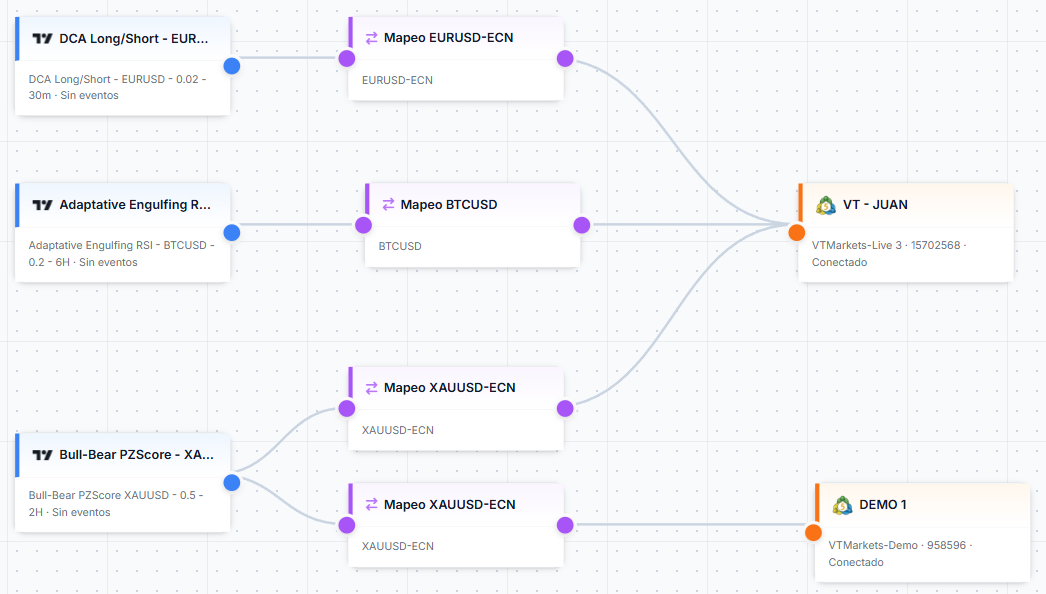
| Copy trading between your MT5 accounts | Included on every plan. Copy trades between your connected accounts, with symbol mapping on each connection. | Not on Core. That plan includes one connection. |
| Manual trades from the TradingView chart | Included with the account. The browser extension sends orders from the chart, and a Windows app covers the TradingView desktop app. | PineConnector Echo, a Chrome extension, sends manual buy and sell orders from tradingview.com. |
| Risk limits and alerts | Included on every plan. Close all positions and pause new trades when floating loss hits a limit you set, as a fixed amount or a percentage of balance. Daily limits, email and Telegram alerts are included too. | The EA has account-protection limits for daily and cumulative loss, with an action when a limit is hit. Core includes email notifications. |
PineConnector Core checked on 26 September 2026. Prices use different currencies and can change; check each product’s terms and any taxes that apply. Sources: Trading Pine Lab Cloud — TradingView to MT5, PineConnector, PineConnector Echo, PineConnector EA. Trading Pine Lab publishes this comparison. PineConnector is an independent product and is named only as a reference. See all Trading Pine Lab plans.
See an alert execute on MT5
A TradingView alert is sent, processed, and executed on an MT5 demo account.
Set up your first connection
- 1
Connect MT5
Add a demo or live account. Trading Pine Lab runs the terminal in its cloud, so your computer does not need to stay on.
- 2
Configure the TradingView alert
Create a webhook, link it to the account in the Connection Editor, then paste that webhook URL and the JSON from the webhook page into your alert.
- 3
Check the result
When the alert fires, confirm the order on MT5.
If you already use PineConnector, replace the webhook URL and the message with the ones Trading Pine Lab shows. Full setup guide.
Questions
Can I try it with a demo account?
Yes. During the 7-day trial you can connect an MT5 demo account and send your own TradingView alerts. No card is required.
Do I need to leave my computer on?
No. Starter includes one hosted MT5 account. PineConnector Core also includes a hosted MT5 instance via Edge, so neither setup runs the terminal on your computer.
Can I reuse my PineConnector alert messages?
No. Set the Trading Pine Lab webhook URL and the JSON message shown on the webhook page. Existing messages are not imported and are not accepted unchanged.
What do I need to connect TradingView and MT5?
An MT5 account in Trading Pine Lab, a webhook linked to that account in the Connection Editor, and a TradingView alert that uses that webhook URL and JSON message.
Try it with your own alerts.
Connect a demo MT5 account and send one of your TradingView alerts.
Start free trial